
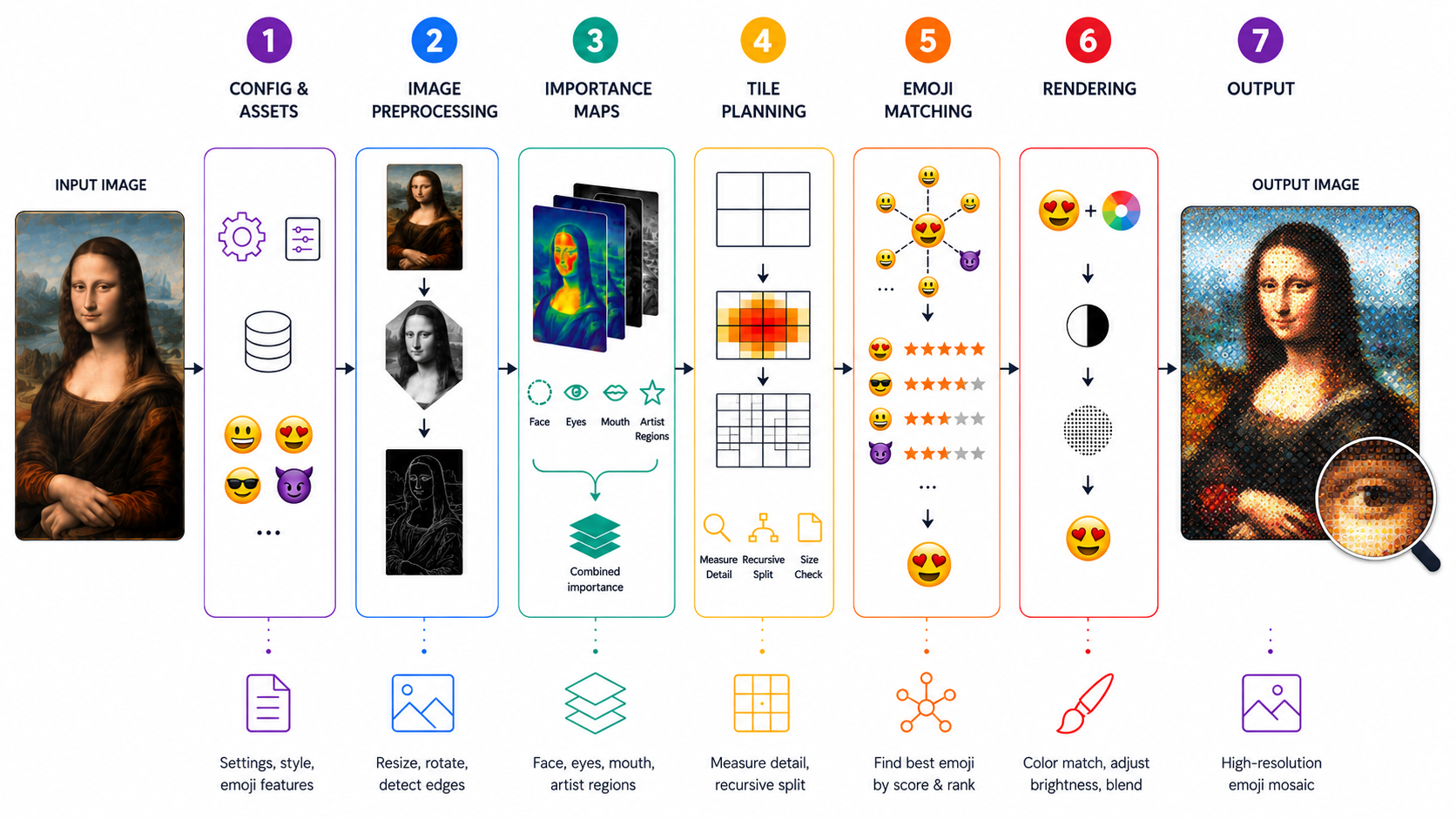
Creating a Diamoji mosaic — a photograph or portrait recreated entirely from thousands of tiny emoji — involves two distinct journeys happening at very different times. The first happens once, long before any artwork begins. The second happens fresh for every image. Together, they make the magic possible.
Building the Emoji Library
Before a single mosaic can be rendered, the system needs to deeply understand every emoji it has available — and there are over 100,000 of them. Each emoji is examined and characterized: What color is it, on average? How much texture and visual complexity does it have? How transparent is it? This analysis happens ahead of time so that the actual rendering process doesn't have to figure all of this out on the fly. Think of it as the system doing its homework. The emojis are then organized into a kind of intelligent index, grouping similar ones together and building fast lookup structures so that later, when the clock is ticking, finding the right emoji for any given spot is nearly instant.
Preparing the Source Image
When it comes time to actually render a piece, the first thing the system does is prepare the source photograph. It resizes it to match the intended output dimensions, computes an edge map that highlights where lines, contours, and fine details exist, and optionally rotates the image if the artwork calls for a diamond-tile orientation. This prepared version of the photo becomes the reference that guides every decision that follows.
Reading the Face
Diamojism artworks often center on portraits, and faces deserve special attention. The system analyzes the image to locate faces, and within those faces, it maps out the eyes and mouth separately — the features we're most sensitive to as viewers. This creates a kind of importance heat map layered over the image: some regions, like the eyes, are flagged as needing far more detail and precision than, say, a patch of background sky.
Planning the Tile Grid
Rather than carving the image into a uniform grid of same-sized squares, Diamojism uses an adaptive approach. Areas with lots of detail — edges, facial features, complex textures — get broken into smaller tiles so the emoji can capture finer information. Calm, flat regions stay as larger tiles, giving the artwork a graphic, bold quality in quieter passages. This subdivision process is guided by both the edge map and the importance map, so a pair of eyes might be rendered in dozens of tiny tiles while an area of plain background uses just a handful of large ones.
Matching and Placing Each Emoji
With the tile grid established, the system works through every tile and finds the best emoji to fill it. For each spot in the image, it looks at the average color of that region, the pattern of edges within it, and how the detail is distributed spatially across the tile. It searches the pre-built emoji index for candidates that score well across all of these factors, then applies one final consideration: variety. Emojis that have already been used many times nearby are gently penalized, nudging the system toward a richer, more diverse visual result. The winner is then composited into place.
Finishing and Output
Once every tile has been filled, optional color adjustments can be applied — brightening face regions, correcting overall tone, or blending the emoji layer with the source image to whatever degree the artistic style calls for. The finished mosaic is written out as a high-resolution image file, ready for print or display. What began as a photograph has become something else entirely: a portrait made of faces, objects, symbols, and gestures — a new kind of picture built from the visual language of our digital lives.